AlphaOne AI
AlphaOne AI Official Logo
Local Windows Proxy Engine • Port 11436

AlphaOne HyperRouter Engine

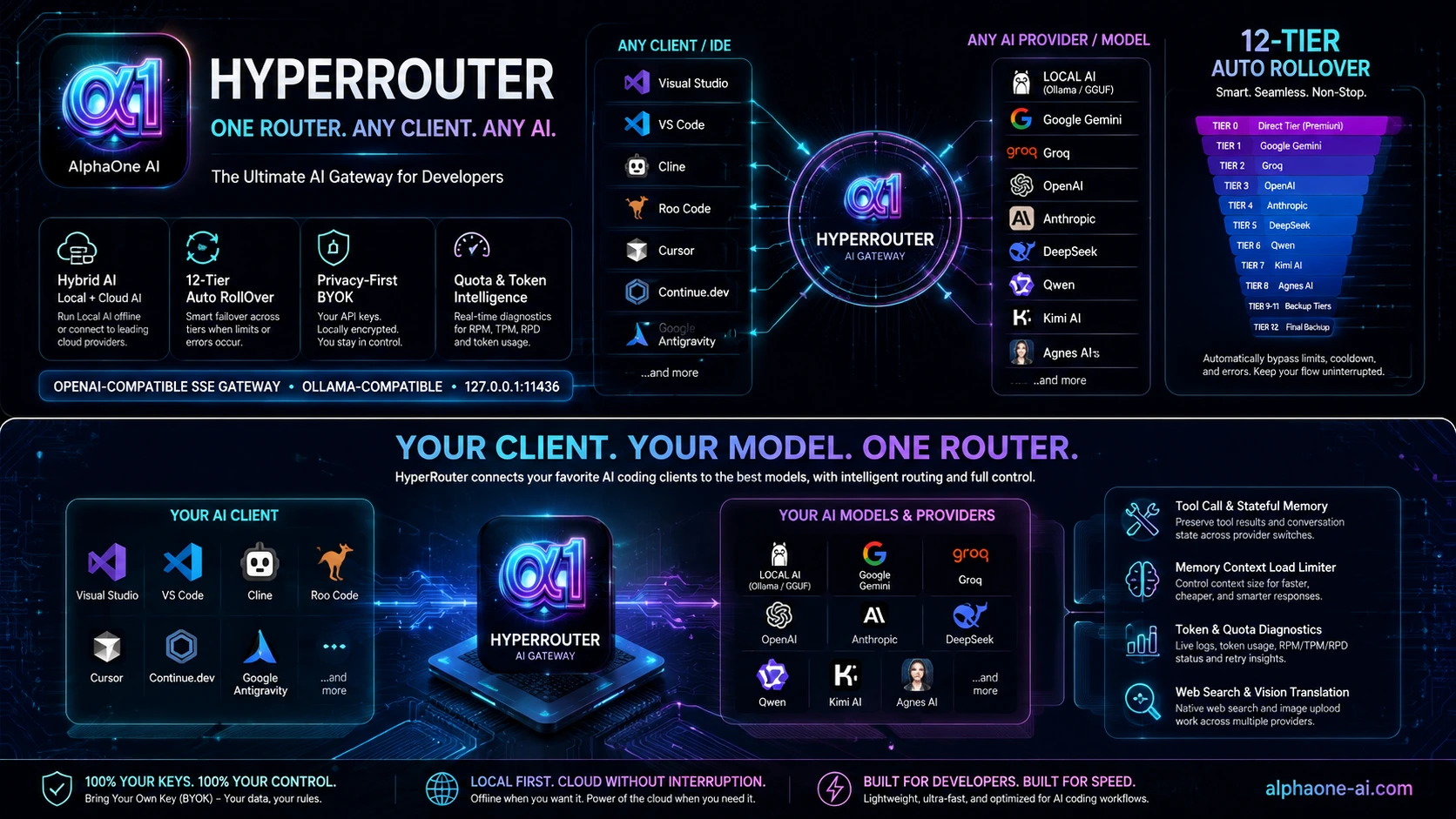
The local-first AI gateway for modern IDEs. Run Local Device GGUF 100% offline, connect your own Local Cloud Modal GPU endpoint, or route compatible coding assistants through Direct BYOK providers and the 12-Tier Auto RollOver cascade.

Instant Access

7-Day Free Trial Included

Experience HyperRouter instantly with zero credit card required! Free Trial grants Full Access to all 12 Tiers, Direct Providers & Local AI sources for 168 hours.

Join Our Beta Program

HyperRouter is in Beta Testing. If the 7-day trial is insufficient, we offer a 1-Month Extended Beta Access for active testers.

Request your 1-month API Key by emailing support@alphaone-ai.com with your MAC Address (found in HyperRouter Settings).

DPAPI-protected local credential storage. Provider and Local Cloud credentials stay protected within the Windows user profile; HyperRouter listens on localhost by default or on an explicitly configured LAN address for Team Sharing.
AlphaOne HyperRouter Engine Complete Architecture Overview

Unified Local AI & Multi-Provider Cloud Gateway

Choose Local Device for 100% offline GGUF execution, Local Cloud for your own Modal-managed GPU endpoint, or Direct BYOK and the 12-Tier cascade for multi-provider cloud routing.

Local AI — Device or Cloud (Priority 1)

Select Local Device for 100% offline GGUF execution with CUDA, Vulkan, or CPU, or select Local Cloud to connect a user-owned Modal-managed GPU inference endpoint. Only the selected Local AI source is used before normal Direct Provider / cascade rollover.

Unified OpenAI-Compatible SSE & Responses Gateway

Translates Local Device AI, Local Cloud Modal, Google Gemini, Groq LPU, OpenAI, Anthropic, DeepSeek, Qwen, Kimi AI, Cloudflare Workers AI, and Agnes AI into standardized OpenAI-compatible SSE streaming and Responses API protocols. Compatible with VS Code, Visual Studio .NET, Android Studio, OpenAI Codex CLI & Codex IDE Extension, Cline, Cursor, Continue.dev, and Antigravity-compatible clients, while preserving active coding sessions across provider rollovers.

LAN Team Sharing & Centralized AI Gateway

Run one HyperRouter instance on a workstation or server and let multiple PCs and laptops connect over the local network through a configurable Server Address and Port. Share Local Device GGUF resources, Local Cloud configuration, cloud provider access, routing settings, and server compute centrally while each client keeps its own independent conversation and Responses session. The internal Local Device llama.cpp runtime remains isolated on loopback rather than being exposed directly to the LAN.

12-Tier Rapid Cascade & Auto RollOver Failover

When an API hits rate limits or quota bounds, HyperRouter automatically tries the next eligible provider or cascade tier. Once downstream output has been committed, it avoids unsafe mid-stream provider switching and preserves canonical continuity for subsequent agent turns.

RPD Auto-Cooldown & Instant Quota Bypass

Tracks daily request and token limits across all model tiers. Automatically quarantines depleted models and bypasses them locally without wasting network roundtrips.

Memory Context Load Limiter

Choose between 🟢 10 Messages (Eco Mode), 🟡 20 Messages (Balanced), or 🔵 Full Context (Default) in Settings to dramatically shrink payload sizes & speed up responses.

Live Status & Logs Dashboard

One-click visual status and request logs dashboards accessible from the Windows System Tray menu, showing real-time 🟢 ACTIVE vs 🔴 SUSPENDED badges, reset timers, and full token metrics.

ANSI Color Code Stripping

Automatically strips terminal ANSI color codes from user prompts to optimize token usage and ensure clean formatting in cascaded requests.

Tool Call Compatibility & Stateful Context Memory

Preserves tool call results across provider transitions (tool_call_id mapping) and persists Google interaction.id state per conversation. For OpenAI & Anthropic, tracks automatic server-side prompt caching (cachedInputTokens) to optimize input token costs on repeated contexts.

Direct OpenAI, Anthropic, DeepSeek, Qwen, Kimi AI & Cloudflare Workers AI Support

Bring official API credentials from OpenAI, Anthropic, DeepSeek, Qwen, Kimi AI, and Cloudflare Workers AI. Cloudflare uses a free-form Model ID entered by the user, so newly available Workers AI models can be selected without waiting for a HyperRouter dropdown update.

Token Usage & Quota Diagnostics

Logs input, cached input, output, thought, tool-use, and total tokens across Google, Cloudflare Workers AI, Agnes AI, Groq, OpenAI, Anthropic, DeepSeek, Qwen, and Kimi AI. Streaming quota errors are classified as RPM, TPM, or RPD with live retry details in the Logs dashboard.

Native Web Search & Real-Time Knowledge Protocol

Equipped with native OpenAI web_search translation and a permanent system-wide protocol across OpenAI, Anthropic, DeepSeek, Qwen, Kimi AI, Google, and Agnes AI for real-time market data, current news, and live API updates.

Multimodal Vision Image Upload Translator

Seamlessly parses image_url and Base64 image attachments from IDEs (Cline, Cursor, Continue) and translates them into native vision blocks for OpenAI, Anthropic Claude, Qwen, Kimi, Google Gemini, and Agnes AI.

Lossless Token Saver & Context Optimization

Provides optional lossless context optimization for Cloud AI requests by reducing unnecessary formatting overhead where a safe transformation can be deterministically verified. HyperRouter prioritizes context integrity over maximum token reduction and automatically leaves unsupported content unchanged. As compatibility may vary with certain tools or uncommon formats, Token Saver can be disabled at any time if unexpected behavior occurs.

Choose Local Device or Local Cloud

HyperRouter supports two exclusive Local AI sources. Use Local Device for GGUF models on your own PC, or Local Cloud to connect your own Modal-managed GPU inference endpoint. Only the selected Local AI source is attempted before normal Direct Provider and 12-Tier cascade rollover.

LOCAL DEVICE • HUGGING FACE GGUF

Run GGUF Models 100% Offline

Download an open-weight .gguf model from Hugging Face and run it directly through HyperRouter with CUDA, Vulkan, or CPU runtime selection. No cloud inference endpoint is required.

Open Filtered Hugging Face Models

🎯 Essential Hugging Face Search Filters

Filter Selection
Tasks Text Generation
Libraries GGUF (Mandatory)
Other / Apps llama.cpp (Recommended)

Download Tips

  • Prefer -Instruct or -Coder models for chat and coding workflows.
  • Avoid -Base models unless you specifically need raw pre-training weights.
  • For a common size/performance balance, Q4_K_M.gguf or Q5_K_M.gguf are practical starting points. Prefer a single standalone GGUF file.
LOCAL CLOUD • MODAL GPU

Run Local AI on Your Own Cloud GPU

Connect HyperRouter to a user-owned Modal managed inference endpoint when you want remote GPU compute without running the model on the Windows device itself. HyperRouter treats Modal as the selected Local Cloud source, not as a Direct Provider or cascade tier.

Open Modal

HyperRouter Settings

  • Local AI Source: Local Cloud (Modal)
  • Endpoint URL: your Modal managed endpoint
  • Model ID: model served by that endpoint
  • Proxy Token ID and Proxy Token Secret: your Modal endpoint credentials

Runtime Behavior

  • Supports OpenAI-compatible Chat Completions, SSE streaming, tool calling, and HyperRouter Responses API transformation.
  • Cold-start HTTP 503 responses can be retried within HyperRouter's bounded startup grace period before normal rollover.
  • No Python, Modal CLI, or Modal SDK is required on the HyperRouter machine at runtime.
Security & billing: Modal Proxy credentials are stored locally using the same Windows DPAPI protection boundary as other HyperRouter secrets. GPU availability, credits, quotas, and charges are determined by your own Modal account and deployment.
Shared Local AI rollover behavior: If the selected Local Device or Local Cloud source fails before output is committed, HyperRouter continues to the configured Direct Provider / 12-Tier cascade without mixing provider output.

Connect to Your Favorite IDE, CLI & Agent

Use HyperRouter as a direct multi-provider AI backend for VS Code, Visual Studio .NET, Android Studio, OpenAI Codex CLI & IDE Extension, Cline, Cursor, Continue.dev, and other compatible coding clients — all through one local endpoint.

OpenAI Codex — CLI & IDE Extension

  1. Core Configuration: Merge this HyperRouter provider configuration into your existing %USERPROFILE%\.codex\config.toml (Windows) or ~/.codex/config.toml (macOS/Linux):
    model = "alphaone-hyperrouter"
    model_provider = "hyperrouter"
    
    [model_providers.hyperrouter]
    name = "AlphaOne HyperRouter"
    base_url = "http://127.0.0.1:11436/v1"
    wire_api = "responses"
    requires_openai_auth = false
  2. Recommended Model Catalog (Optional): To allow Codex to cleanly recognize model capabilities (tools, 128k context) without fallback notices, create %USERPROFILE%\.codex\hyperrouter-models.json:
    model_catalog_json = "C:/Users/YOUR_USERNAME/.codex/hyperrouter-models.json"
    {
      "models": [
        {
          "slug": "alphaone-hyperrouter",
          "display_name": "AlphaOne HyperRouter",
          "description": "Single HyperRouter model; High/Medium/Low/Custom is controlled from the HyperRouter Dashboard",
          "default_reasoning_level": null,
          "supported_reasoning_levels": [],
          "shell_type": "shell_command",
          "visibility": "list",
          "supported_in_api": true,
          "priority": 1,
          "upgrade": null,
          "base_instructions": "You are a coding agent operating through AlphaOne HyperRouter. Use the available tools to inspect, edit, run, and test the current workspace as required.",
          "support_verbosity": false,
          "default_verbosity": null,
          "truncation_policy": {
            "mode": "tokens",
            "limit": 10000
          },
          "supports_parallel_tool_calls": true,
          "supports_image_detail_original": false,
          "context_window": 128000,
          "max_context_window": 128000,
          "experimental_supported_tools": []
        }
      ]
    }
  3. Codex CLI & Extension: Launch codex in terminal or open Codex Extension in your IDE. Both share this configuration automatically.
Supports local Codex CLI and Codex IDE Extension through HyperRouter Responses API.

Visual Studio IDE (.NET Copilot Chat)

  1. Open GitHub Copilot Chat (Ctrl + Alt + C) → Model Selector → Manage Models.
  2. Click Add Model Provider → Provider Type: Ollama.
  3. Base URL: http://127.0.0.1:11436.
  4. Click Add Model and enter alphaone-hyperrouter as the model name/ID.
  5. Select alphaone-hyperrouter in Copilot Chat. The active High / Medium / Low / Custom profile is controlled centrally from the HyperRouter Dashboard.

Visual Studio Code (Native Custom Endpoint)

  1. Press Ctrl + Shift + P → Chat: Manage Language Models → + Add Models.
  2. Select Custom Endpoint | Name: AlphaOne AI Auto | Key: sk-alphaone.
  3. Click Chat Completions and insert JSON payload:
[
  {
    "name": "AlphaOne AI",
    "vendor": "customendpoint",
    "apiKey": "${input:chat.lm.secret.-601a523f}",
    "apiType": "chat-completions",
    "models": [
      {
        "id": "alphaone-hyperrouter",
        "name": "AlphaOne HyperRouter",
        "url": "http://127.0.0.1:11436/v1/chat/completions",
        "toolCalling": true,
        "vision": true,
        "maxInputTokens": 1048576,
        "maxOutputTokens": 64000
      }
    ]
  }
]

Android Studio (AI Assistant)

  1. Select Manage Models.
  2. Click the + (Add) button.
  3. Select Local Provider.
  4. Description: HyperRouter | Port: 11436.
  5. Click Refresh.
  6. Select or enter alphaone-hyperrouter. The Dashboard controls the active High / Medium / Low / Custom profile.

Cline / Cursor Extension

  • API Provider: OpenAI Compatible
  • Base URL: http://127.0.0.1:11436/v1
  • Model ID: alphaone-hyperrouter
  • API Key: sk-alphaone (Any text)

Continue.dev (~/.continue/config.yaml)

models:
  - name: AlphaOne HyperRouter Engine
    provider: openai
    model: alphaone-hyperrouter
    apiKey: sk-alphaone
    apiBase: http://127.0.0.1:11436/v1
One Model ID, Central Profile Control
Configure every IDE, CLI, or coding client with alphaone-hyperrouter. Then choose HIGH, MEDIUM, LOW, or CUSTOM from the HyperRouter Dashboard. The selected profile remains active during Direct Provider Auto RollOver, while Fallback Priority independently controls which provider is attempted first. Existing providers keep their normal profile mapping; Cloudflare Workers AI always uses the user-configured Cloudflare Model ID for HIGH, MEDIUM, LOW, and CUSTOM.
Direct Provider Model Selection:
Google Gemini: Gemini 3.8-Flash (High / Medium / Low Thinking)
OpenAI: Astra (Architect), Sol (Code), Luna (Fast)
Anthropic: Opus (Pro), Sonnet (Code), Haiku (Light)
DeepSeek: DeepSeek V4 Pro, DeepSeek V4 Flash
Kimi AI: Kimi K3 (1M Context), K2.7-Code, HighSpeed
Qwen: qwen3.8-max, qwen3.8-flash, qwen3.7-plus
Custom (OpenAI-Compatible): User-configured Endpoint & Model ID
Cloudflare Workers AI: User-selected Model ID
Example: @cf/qwen/qwen3.8-27b
HyperRouter Settings
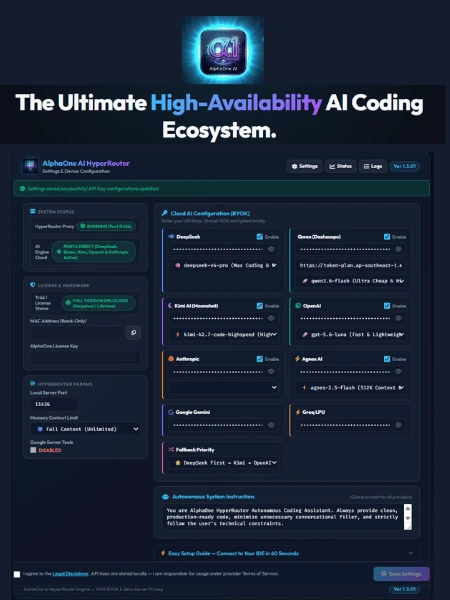
AlphaOne HyperRouter Settings UI

Control Credentials, Memory Limits & System Tray Status

Configure your environment seamlessly via http://127.0.0.1:11436/setting or open the live 12-Tier Status Dashboard directly from your System Tray.

Instant Auto-Router Activation

By entering at least one provider key, the cascading failover algorithm is instantly activated. The system intelligently routes and rolls requests through compatible model tiers.

Local Credential Storage

Provider API keys are stored securely within the local HyperRouter Windows user profile and are not stored by an AlphaOne-managed cloud account. HyperRouter uses them directly only when authenticating to the configured upstream provider.

Key Distinction: License vs. Provider API Keys
  • HyperRouter License Token (a1_live_...): Unlocks software routing capabilities, enabling the 12-Tier cascade failover engine across all models.
  • Provider API Keys (BYOK): Determine your actual token volume and rate limits (RPM, TPM, RPD) provided directly by official AI providers (OpenAI, Anthropic, DeepSeek, Qwen, Kimi AI, Google, Cloudflare Workers AI, Agnes AI, Groq). Free or Paid API Key quotas apply based on your own provider accounts. HyperRouter does not provide API tokens.

Multi-Provider AI Hierarchy & Cascade Matrix

Local AI sources (Local Device GGUF or Local Cloud Modal) and Direct BYOK providers (OpenAI, Anthropic, DeepSeek, Kimi AI, Qwen, Google Gemini, and Cloudflare Workers AI) work together with HyperRouter’s 12-Tier Auto RollOver cascade across Gemini, Agnes AI, and Groq LPU. One HyperRouter connection powers VS Code, Visual Studio .NET, Android Studio, OpenAI Codex CLI & IDE Extension, Cline, Cursor, Continue.dev, and Antigravity-compatible clients, automatically moving to the next available AI when quota or provider failures occur.

Authorized Providers Only
HyperRouter routes through official APIs, user-owned credentials, and provider-permitted local models.

Tier Provider Model Identifier Capabilities & Primary Role
Direct Tier 0 Google Gemini Direct gemini-3.8-flash-high / medium / low Direct Google Gemini 3.8 Flash with dashboard-controlled High, Medium, or Low thinking level for Paid accounts.
Direct Tier 0 OpenAI Direct gpt-6-astra / sol / luna Direct OpenAI flagship models. Selectable in settings with instant failover priority.
Direct Tier 0 Anthropic Direct claude-opus-5 / sonnet-5 / haiku-4.5 Direct Anthropic Claude models. Selectable in settings with instant failover priority.
Direct Tier 0 DeepSeek Direct deepseek-v4-pro / flash Direct DeepSeek models. Selectable in settings with instant failover priority.
Direct Tier 0 Kimi AI Direct kimi-k3 / kimi-k2.7-code / highspeed Direct Kimi AI (Moonshot) 1M context deep reasoning & specialized coding engines. Selectable in settings with instant failover priority.
Direct Tier 0 Qwen Direct qwen3.8-max / qwen3.8-flash / qwen3.7-plus Direct Qwen Dashscope models with custom Base URL. Selectable in settings with instant failover priority.
Direct Tier 0 Custom Direct User-configured Model ID
Example: gemma-4-26b-a4b
Direct custom OpenAI-compatible endpoint with custom Base URL, API Key, and Model ID configured in HyperRouter Settings.
Direct Tier 0 Cloudflare Workers AI Direct User-selected Workers AI Model ID
Example: @cf/qwen/qwen3.8-27b
Direct Cloudflare Workers AI through the configured Account ID, API Key / API Token, and free-form Model ID. The user-selected model remains unchanged across HIGH, MEDIUM, LOW, and CUSTOM profiles and participates in Direct Provider Auto RollOver.
Tier 1 Google gemini-3.7-flash Flagship primary model supporting up to 1M context architecture (Token limits governed by your Google API quota).
Tier 2 Google gemini-3.6-flash High-speed, high-capacity primary fallback model (1M Context).
Tier 3 Google gemma-4-31b-it Open weights high-intelligence reasoning model from Google.
Tier 4 Google gemma-4-26b-a4b-it Open weights specialized coding model from Google.
Tier 5 Google gemini-3.5-flash High-speed fallback model (1M Context).
Tier 6 Google gemini-3.5-flash-lite High-speed lightweight Gemini engine for rapid response (1M Context).
Tier 7 Google gemini-3-flash-preview Experimental preview model for advanced syntax analysis (1M Context).
Tier 8 Agnes AI agnes-2.5-flash Ultra-large 512K context window & specialized coding buffer.
Tier 9 Groq LPU llama-3.3-70b-versatile Ultra-fast LPU reasoning with 70 billion parameters.
Tier 10 Groq LPU llama-3.1-8b-instant Instant low-latency sub-second response fallback layer.
Tier 11 Groq LPU qwen/qwen3.6-27b Multilingual & specialized multi-language coding model.
Tier 12 Groq LPU openai/gpt-oss-20b Emergency final standby model for continuous uptime.

Official License Tokens (`a1_live_...`)

Choose the plan that suits your coding workflow. All paid licenses include Free Software Upgrades as long as your license is active.

Monthly

1 Month

Full 12-Tier Access + Free Upgrades during active period.

Quarterly

3 Months

Full 12-Tier Access + Free Upgrades during active period.

Semi-Annual

6 Months

Full 12-Tier Access + Free Upgrades during active period.

Annual

12 Months

Full 12-Tier Access + Free Upgrades during active period.

Ready to Upgrade Your IDE Coding Experience?

Download the official Windows application (AlphaOne.AI.Bridge.exe). Runs silently in your system tray on Port 11436.